Hodago

knowledges for web , e-commerce ,computer ....

Basic Design Tips For eCommerce Websites

Written by Hodago on 11:08 PM

The single most important objective of an eCommerce website is making the visitor buy something. And this is what web design for e-commerce applications should aim to achieve. There are many principles to be considered by website designers, all of them relating to online selling techniques.

eCommerce website design is different from any other website design. This is mainly because they must be attractive to the visitor, well organized and use the right colours that fit the website spirit. Nevertheless, a closer look at some successful eCommerce websites will allow you to see the conceptual differences that are typical in a successful eCommerce website. Of course the site should adhere to current web standards, with well written code and be accessible, however the focus of this article are those elements which help the web site sell.

The key selling principle of an eCommerce website is that of giving the user a pleasant experience during his online shopping. Website designers must also be certain that they provide enough information on who owns the website and provide standard data encryption via SSL. eCommerce websites must be easy to use, otherwise the visitor will simply leave and search for their goods or services on another website, probably that of the competitor!

Unlike the supermarket our website has no smell. In an eCommerce website, the distance from one point to the other is pretty much the same, however you can try to order your visual shelf in the way you think will best expose the visitor to key products.

A competitive eCommerce website design will lead the visitor to the right page in one or two clicks at most. Sometimes web designers will use techniques that would never be considered for non-eCommerce websites. As you all know, with increasingly popular sales letter websites the only link is to the order form. Nevertheless, these sales letters usually sell only one product and are not the most typical eCommerce websites. The web designer gets the opportunity to take full advantage of the one click. Believe it or not, those sales letter websites are actually selling.

An eCommerce web design is very much about the layout. It is crucial to catch the visitor's attention and the place where they look first when accessing a web page. Research on this topic has determined that the middle left side area will attract the most attention, followed by the center of the page. By using these techniques web designers try to draw the navigation path for the visitor!

About the author

Web Design Edinburgh www.webdesignersedinburgh.com

What Online Business Should You Start?

Written by Hodago on 9:28 AM

A very common question, especially from people new to internet marketing is “what business should I start” or “what niche market should I get into” or my favorite “what is the most profitable business topic”.

My answer…

There are NO bad markets! I know, that’s different from what most people will say, but hear me out…

It doesn’t matter if you want to start a business selling shoes online, become a freelance writer, or even give tattoo advice (yes, I made money online doing just that!).

Whatever you want to do, you CAN do it online and you CAN make money doing it. There are however, a few “guidelines” I follow when picking a business topic or niche market.

  1. The bigger the market, the more money can be made. This is pretty obvious, but many people overlook the concept. Obviously there are more people who want to lose weight than there are people who want to teach their cat to do back flips. Don’t be scared of getting into big markets though. Just because that’s where the “big boys” (or girls) play doesn’t mean there isn’t room for you to come in and get a piece of the pie. In fact, I prefer large markets over small niche markets any day (for reasons you’ll learn about below)…
  2. The group of people you are targeting have to be willing to spend money (or at least do something for you that earns you money - ie click your ads). Again, the more money people have to spend, the more you can make. BUT, just because you want to get into a market that doesn’t have much money, it doesn’t mean you can’t make money from that business idea. Look at all those celebrity gossip blogs and websites. Those site owners have readers who rarely buy products from them, but they are earning millions of dollars by displaying ads to the hundreds of thousands of visitors they who are reading their websites each day.
  3. Pick a topic that is interesting to you. If you are not interested in the business, you will not be motivated to work on the business. I fell in that trap a couple times, and the most money I’ve ever made online was with businesses that I was passionate about. It doesn’t feel like work when you do something you love doing.
  4. Pick a topic that other companies would be interested in. Like I always say, your business exit strategy should ALWAYS be to sell your website at some point. When I start a business online, one of my first steps is to find a company that I would like to get acquired by one day. I build the business to compliment nicely with this other business right from the start. I try to target their same customer demographic, offer similar but non-competing products, maybe join their affiliate program to begin building a business relationship with that company, etc. Then when I want to sell the business, it’s practically sold before I even list it for sale because it’s such a perfect match for them. Big businesses grow by acquiring smaller businesses like yours, get used to the idea and you might get rich in the process…
    (even if you don’t end up selling your website to this company, there will likely be others like them that will want to buy your business, such as their competitors!)
  5. Try to stay away from trends or fads. Things like “specialized diets” (ie Atkins) that fade away a few months after they are released are not good business models. Yes, you can make money from trends and fads, but it’s not a very good long term plan.

It really depends on your goals and how much money you want to make. If you are happy with earning an extra $300 per month from your web business, then you can start almost any kind of website to make that much money. If you want to make at least $75,000 per month, then you need to focus on the bigger markets and be prepared to work a little harder.

I know most of these tips you’ve never heard before, but I guarantee it’s the most valuable advice you’re going to find online.

Until next time…

Earn money with blog

Written by Hodago on 7:58 PM

So I increased a little bit more activity on digitalpoint to do an experiment. But while I am visiting it more often stupid threads with titles, make big money blogging. Where the guy ask a question how do you make big money blogging. Or someone saying start blogging if you want to make big money blogging. First I will say big is a very subjective word. Second I will show you how I make money blogging.

How Much Money do I make?

How Much Money Do I make

I will say it like this I don’t make any where close to how big blogger make from their blog. But I am averaging around 2300 - 2400 USD a month from Balkhis. Now you are wondering how do I make that money from Balkhis. More yet, thinking how do I survive from just that little income. Because that is only 28000 yearly. But you have to understand a good portion or a major portion of my income comes from my web design company, Uzzz Productions which puts me close to six figure marks gross. Now lets get into how do I make money blogging.

Google Adsense

Google AdsenseAdsense is something that I don’t incorporate in all of my posts, but I put it in the posts that are popular. Or the ones that are likely to get tons of traffic mostly tutorials. Aside from that, I have adsense in the header banner that makes me a decent amount of money, but it is not the majority. I mostly use the size 336 x 280 and 468 x 60. So use those because they work the best.

Private Ad Sales

Private Ad sales are a good one. I have header banner for sale as well as sidebar buttons. Also paid reviews. Those account for some of my income, but this one is still not the majority. Mostly direct ad sales are a pain to manage, but I use OIO Publisher to do it myself. I don’t believe in giving my money to any of the companies like Text Link Ads or Review me because they take up so much of the commission, you won’t get the money that you deserve. So do it directly with OIO Publisher.

Affiliate Marketing

The biggest Chunk of Balkhis Income comes from Affiliate marketing. How do I do it? Well I use Commission Junction for the most part, and Market Leverage as a secondary earner. Commission Junction have the most offer then you can imagine. So if you use them you are most likely to find offers that you want. I usually use hosting and other different sorts. If I am writing a post, and I think that I can find something that would be a good product. I head over to Commission Junction and run a search. And sometimes I write posts entirely based on the products, and it works very well also. So now if I just embed the CJ link it doesn’t do it. So I use WP-Affiliate Plugin that lets me make urls like balkhis.com/refer/xxxx so that helps me track the urls and see how it works. Now some people say Balkhis why people buy the products from your site and not from mine when I place the affiliate codes. And I will say, I really don’t know. I will probably say read the post How to make sales from your blog and earn profit. That have a little bit of answer. But that should cover that.

My costs of running / Advertisement

How much does it cost me to run Balkhis. Time and hosting fee. I switched to host gator reseller which cost me $25 monthly, and that is about it. I buy ads on a few sites thats it which is not very expensive. Rest is just social media. I am not one of those people who spend a lot of money.

I don’t think I will write this sort of post again unless I add new ways of making money. But if you are interested then head over to my make money online page.

Source: Internet

Make Money with Website

Written by Hodago on 7:53 PM

Finally, you've found a website that gives realistic information about making money on the internet. Frankly if you don't have knowledge of computers and internet, your chances are very slim of making on internet. So, you want to make money from web site ! Like you I decided to make money from my website. It took me whole 6 months to know all about this fascinating way of making money from home.

Now, $2,000 in a month is probably not the norm for most participants. My first check was around the $400, but it shows you what is possible if you learn how to capitalize on this opportunity. Even if you earn as little as $25 in a month, it would more than likely cover some or all of the costs for your web site.

Have you ever wondered how do websites make money ? Answer is simple. Websites turn to a host of money making activities like affiliate programs. Website is the ultimate money making machine, it earns even when you are sleeping. So instead of earning few $s from 10 different websites, it is wise to have your own website and only effort you have to put is to make your website popular, in return you can earn hundreds of dollar every month :)

Anyone who has a website, or can build a website, has a great basis for making money online. Any web site can get advertisers even if it is relatively unknown. Most of the websites, now a days earn extra income from this great opportunity called Pay-Per-Click Contextual Advertising.

The big BOSS of Contextual Advertising is Google Adsense !

Thanks to Google’s Adsense network contextual advertising, with the short text based links that appear next to a website’s content, is a very hot item on the internet now.

The pay-per-click contextual advertising has grown into a $ 3 billion business. With the entry of biggies like MSN and Yahoo in the Contextual Advertising world this is expected to become 15 billion annual business by 2010. Well, no one seems to loose this opportunity of money making online. So, why you ?

All need is a website on any topic. Google Adsense will serve ads on your website and if any of your visitor clicks on them, you make money, SIMPLE ! If you have a website which is running all you have to do is to insert "Google Contextual Ads" on all the web pages of the site at appropriate places and website will start earning money instantly !

Read all about Contextual Advertising !

Another way, by which web sites earn money are Affiliate Programs. So, what are Affiliate Programs - Affiliate programs allow you to make money from your website by displaying advertisements on your pages and receiving commissions per click through or product sold. Affiliate programs are another way of making your web site profitable.

Affiliate Network is an intermediary from where you can choose affiliate program from a wide range. The process to join a Affiliate program/network is very simple. Just visit their site and fill their application form. You will get instant consent in some programs while in others manual checking of your application is done. On approval, you will get a piece of HTML code, to be cut and pasted on your website..

Read all about Affiliate Programs !

Quick tips on making the most from your affiliate programs.

1. Choose 2 or 3 affiliate programs. As the saying goes, don't put all your eggs in the one basket. If one affiliate program stops, you still have the other 2 to back you up until you find another.

2. Always chose affiliate programs that suit the content of your website. It makes no sense to advertise cars to your visitors for example, if they have come to your website looking for arts and crafts.

3. Try to deep link the programs you are promoting. That is, make a page showing the product and then link from that direct to the shopping cart of the merchant. It has been proved that the deep linking or white label method creates more sales than banner advertising.

Don't give up if your affiliate program isn't working from the start. Keep adding content to your website that will attract visitors. The bigger your site is, the more visitors you will attract, which means the more opportunity to make money from affiliate programs.

Now, let's talk of money expenditure. You need to spend money to -

Buy a domain name
Buy web hosting space
Get your web site designed from professional (You can do it by yourself too !)

A good and affordable company is economicalhost.com. You can buy domain name for Rs. 450/- and 250 MB web space for Rs 1200/- .

Theme of your website - Prefer a theme for your website on which content is easily available from offline sources like, magazine, newspaper, books etc. This has many advantages,firstly you can find large volome of content for your website, remember larger website perform batter as they keep visitor on your web site for longer time, secondly, you don't have to waste much time searching for content to update your site.

Importace of Content - Want to know what makes one website a stand-out when others fail ? In a word, it's content. Visitors to your website want to find a clean, readable design that has the right fonts and colors and quick downloads--but then they want the design to "get out of the way." Web users are voracious consumers of information. In fact, today's web surfers are looking at more web pages in a single session than ever, but are spending less time per page. So for your site to deliver customer satisfaction and build sales, effective content is of paramount importance.

Content should be fresh, informative and unique. This will make visitor to stay and come again. Update your web site with fresh content regularly, so that evey time visitor come to your web site to find new information.This will increase the credibility of your web site.

Must for a website:

Professional Look - Professionally designed web site helps to increase credibility of your web site.
You should provide visitors a way to contact you from web site.
Provide your web site visitor a option to subscribe update newsletters.

Optimizing your Web site to Earn Money:

If you have a website which is running all you have to do is to insert "Google Contextual Ads" on all the web pages of the site at appropriate places and website will start earning money instantly !

If you have poorly running website. Hey ! you need to work on it :

Search Engines Optimization of your Website
Insert Google Contextual Ads script
Insert Affiliate Merchant's Banner Code
Search Engine Submission
Web Promotion

If you don't have a website, no problem just make one, these days making website is a fun with the availability of HTML editors like Dreamweaver.

Now , if you are planning to design your website in order to make money. I would advice you to read following sections, so that when your website is up on net, it is fully optimized for various search engines, because most of the traffic you site is going to get from these search engines, and best of it, for no extra cost.

Start from here along with designing your website -

Keyword Research
Search Engine Optimization - Optimizing Website Ranking Factors
Search Engine Optimization - Link Popularity
Search Engine Submission
Web Promotion

The secret to making money online is to make a very solid informative web site on a subject that you enjoy. The bigger your site is, the more visitors you will attract, which means the more opportunity to earn money from affiliate programs.

Yes, you can make a decent living as an affiliate, you may even generate substantial income very quickly - but the reality is that in the start-up stages it can be very hard work. I hope your strategies and my articles will assist you in achieving your online goals !

workathomedesk.com

Make Money with the Right Online Business Model

Written by Hodago on 7:43 PM

Today, there is no longer any doubt regarding whether or not people can actually make money online. The question now is how to make money using the resources provided by the Internet.

Many people get excited about any online business because it is a great way to make money while doing just the right amount of work.

If you are one of those people, try to keep in mind that not every online business will suit you in terms of your preferences, working style, and profit goals. Before you take on any online business, be sure that you compare all that is available and choose the perfect one for you.

There are so many online business models to choose from and it can become very enticing to take one on simply because of how much money others have been making from it.

However, before you even start choosing an online business model, it is important that you first determine your preferences, your profit goals, and your working style. Only then can you start to figure out which online business model you can actually generate profit with on a long term basis.

If you have lots of time on your hands and you like to write reviews on products, affiliate marketing may be your best option. With affiliate marketing, you can make use of your interests to profit online.

If you are the type of person who likes to take risks and keep Internet marketing efforts to a minimum, you may want to try investment options such as forex trading.

This will allow you to have an online business that you do not have to work on for many hours each day. However, it will be important for you to keep up-to-date on financial news and trade wisely to make money.

Of course, there are so many other online business models to choose from.

However, you will not be able to determine which one is for you until you take the time to compare all. If you end up choosing the wrong one, you may lose interest in the long run and you may not be able to make money with the online business model you have chosen.

SEO - Do You Know Enough About Page Rank?

Written by Hodago on 7:22 PM

Internet has started a rat race for those participating in the competition to try all measures in a bid to outdo the others. As you are aware that having a website is just not enough, there has to be heavy traffic influx to increase the popularity of your website. How is the popularity of a website determined? With the help of page ranking. page rank is the value given to your website that denotes the importance of a web page.

This is a system that Google has created where it gives importance to a web page if it linked with another page or it is having another webpage cast a vote for your web page. The more votes you get for your webpage the more important your page becomes. The rating of a page rank varies from 0 to 10 and if your website has a page ranking of 5 and above, it is considered to have important information and attracts more visitors.

The importance of the page rank is limited not only to enabling it to secure a rating for your webpage but is also a parameter to check the quality of the websites that provides links. Your website will have high page rank if it has a lot of good back links. If your website contains useful information devoid of any back links your website will be right below in the grading list.

When Google positions your page on the topmost position in the search engine results, it means your website has a high page rank and since it is ranked high the visitors will visit your site often with the thought that they will get whatever information they are looking for.

If you want to check PageRank of your website then feel free to visit Check PR.

Article Source: http://EzineArticles.com/?expert=Jitesh_Arora

How to Choose a Web Host

Written by Hodago on 3:56 AM

There are many Web hosting companies offering a variety of services. Be sure to choose one that fits the specific needs of your site.

Step1:
Make sure the host's server provides a sufficiently fast connection to the Internet. A T3 connection is optimal, but a T1 will work for most Web sites. A dial-up connection is usually much too slow.

Step2:
Find out how many machines will be sharing the server with you. You don't want to be slowed down by traffic from other sites. Compare this number with other hosting services to give yourself negotiating room.

Step3:
Investigate limits on bandwidth and hits. Make sure you won't be charged severely if a lot of traffic goes through your site. Look for reasonable flat monthly rates as opposed to rates based on use.

Step4:
Find out what kind of customer support the host offers. Twenty-four hour support and speedy replies aren't unreasonable demands. Try to avoid paying for customer support.

Step5:
Plan ahead when thinking about Web space. The amount of space you need depends on the nature of your site, but be sure to give your site room to grow.

Step6:
Look for a company that offers virtual hosting. This will allow you to use your own domain name (www.yoursite.com) as your URL as opposed to a directory within the host's domain (www.host.com/yoursite). If you don't feel that you need your own domain name, save money and stick with the host's URL.

Step7:
Make sure the host provides adequate CGI-bin access if you'll be using forms, and that the CGI bin can support your scripts. You should have your own CGI-bin directory with unlimited access.

Step8:
Opt for Web-based administration if you're unfamiliar with Web programming. This will provide a Web-based interface for the maintenance of the site.

Step9:
Look for a host that offers FTP and Telnet access to facilitate uploading files and editing CGI scripts.

Step10:
Evaluate your e-mail needs. Some servers offer POP mailboxes, while others simply offer aliases that reroute mail to existing mailboxes. Some hosts put limits on the number of allowed aliases. Make sure you fully understand the host's e-mail services.

Tips & Warnings


  • If you'll be doing business through your site, be sure to get SSL (Secure Sockets Layer) security for transferring credit card information.
  • Ask about reduced rates and free services for non-profit and student-run Web sites if applicable.
  • Ask about special features like anonymous FTP, mailing list management and e-mail auto-replying. Also ask if the host company will maintain statistical data for your site.
  • Be sure to tell your host which platform you're using (UNIX, NT, MacOS, etc.) and make sure the host can support it.
  • Your current ISP may be able to offer sufficient Web hosting services if your site isn't too sophisticated.
  • Some hosts offer the option of "vanity domains" instead of virtual hosting. This will give you a URL of the form, "yourname.host.com".
  • Many hosts that offer virtual hosting will offer to pay for and handle your domain name registration, but be careful. Make sure your name, not the host company's name, is listed as the administrative contact with InterNIC for your domain name. Otherwise, switching hosts later may be difficult.
  • Avoid buying into long-term contracts to save money. You want to be able to switch hosts whenever you want.

How to Build an eCommerce Website

Written by Hodago on 7:28 AM

So you want to open an e-store but you’re not sure where to begin. Building an e-commerce website can be overwhelming and frustrating if you have no experience in doing so. Well, lucky for you it’s not as complicated as it may seem. Just follow these steps and your store will be up and running in no time.

Step1 :
Research the type of products you want to sell. Do a basic Google search to get an idea of how many other sites are selling the type of products you’re looking to sell. Also, using a keyword search tool (Overture or Google Adwords) figure out how many keyword searches were done looking for your products. Too many stores and you may want to rethink your product. Too few searches and you may also want to rethink your product.

Step2 :
Make a decision on how you’re going to ship your products. If you’re going to use a drop-shipping company, conduct research on which companies will be the best for you and your needs. If you’re going to store them yourself, conduct research on wholesalers who are offering the best prices on the products you want to sell. Then, find space in your home or rent a nearby storage facility to keep your products.

Step3 :
Choose and register your domain name. You want to choose a name that is short, easy to remember and best describes what you’re trying to sell. After deciding on a name, you will need to have it registered. There are plenty of companies where you can register a domain name for as little as $4.99 a year. GoDaddy.com is a popular choice.

Step4 :
Decide on a web hosting company that combines hosting with a website builder. You want to choose a company that specializes in e-commerce sites and already comes with an integrated and secure shopping cart.

Step5 :
Use the website builder to create the pages for your website. Take the time to learn a little HTML so you can add creative changes to your website. HTML.net is a good place to go to learn the basics of HTML. The templates the website builder offers are great, but you don’t want your site to look generic.

Step6 :
Open a Paypal account and add it to your website, even if your website has a shopping cart. Paypal is the biggest of the online shopping carts and the easiest to use. Visit the Paypal website at Paypal.com and follow the step-by-step instructions they have listed.

Step7 :
Upload your products to your website. Create appropriate categories and sub-headings so your site is easily navigable and your products are well organized.

Step8 :
Market your website. Write articles and submit them to ezines. Contact similar websites and ask for a link exchange. Use the top keywords you found for your products and use them throughout your website. You want to make sure your website ranks high when keyword searches are performed for your products.

How to Choose The Best keyword Research

Written by Hodago on 7:20 AM

Step1 :
Keyword research is the core of any SEO campaign, since the keywords you pick during the research will be included in your website copy, into your PPC campaigns and any other website promotion campaigns. Keywords are extremely important because they act as a marker for search engines. Wordtracker is a great tool but after analyzing the keywords from wordtracker it is defnitely best to go to google trends and be certain that the data is right. go to the free keywords wordtracker tool and search the terms (that gives an estimate of the daily searches- so for monthly just multiply by 30). go to free keyword discovery tool and search — knowing that the number that they give is per year and not per day.


Step2 :
Also, you may want to use other search engine data keyword research tools, such as:Google Keyword Suggestion ToolWordTrackerKeyword DiscoveryOverture. Google Keyword suggestion tool can give you keywords, related to your website (if you select the appropriate tab) and offers you a wide selection of phrases real people have typed in.

WordTracker and Keyword Discovery offer free versions of their keyword research tools. They give you a list of keyword phrases with your keyword and also give you some estimation of their popularity. WordTracker uses the data from the meta search engines and keyword discovery obtains data in another way (undisclosed, so far), so the online tools data can only be used in a relative aspect (to learn which phrases are more or less popular than others and also how competitive they are).

Step3 :
Google External Keyword Tool goes 2nd, as it offers lots of related words and phrases, otherwise unnoticed by other keyword research tools.

If your site is new, there is no way you can come up for a competitive keyword within a couple of years, so you'll need to target non-competitive keywords.

However, you can't be afraid to optimize for the keyword phrases that are the most relevant to your products and services, regardless of KEI numbers. KEI, which stands for Keyword Effectiveness Index, is a number of times a keyword has appeared in Wordtracker's data compared to the number of competing Web pages. In other words, the higher the KEI, the more popular your keyword phrases are, and the less competition they have.

So, if your KEI is 400+ but your count is 20 a month most probably keyword not worthy to spend time on. Your keywords should be used two to three times for every 200-300 words of copy on your website.

Use your keyword research tool to get a good estimate of the overall search volume. You need to be extremely careful with keyword research so that you don't miss excellent opportunities or aim so broadly that you target phrases that will never rank well.

Step4 :
The best way to find out how much competition there is for a keyword is to use the Google Keyword Tool. With the Google Keyword Tool you can see how popular the search term is and the advertising competition side by side. However, if you do not want to use the tool an alternative method is to simply type your keyword into the Google search page and look at how many Ads are listed on the right hand side of the page.

Modern Web Design Style

Written by Hodago on 1:38 AM

For this tutorial, I'm taking a temporary departure from realistic lighting, smooth bevelling, metallic effects, and soft shadows... :)

Welcome to a world of sans-serif fonts, monocoloured areas, objects that don't cast shadows, colours that don't contrast, and text saved as picture files.

Modern-style web design, also known as the "Microsoft style" has become the most common form of web design these days. It presents web page elements not as realistic images, but as neatly arranged diagrams.

This tutorial goes through the steps to making a website in this style.

1 – Creating some header text

Choose a sans-serif font (a font with no curly bits), such as Verdana and write a title. Don't put a space between the words - just make the first word bold and the second word grey.

In Adobe Photoshop 5.0, you'll have to use the text tool twice - once for each colour. In Adobe Photoshop 6.0 and 7.0, you can just select the second word and change its colour.

Click File > Save for Web. Choose Jpeg, Quality 60. Do this for every image in this tutorial.

2 – Creating the menu

Create a thin image like this one and fill it with the colour of your choice. (This orange contrasts with both black and white.)

To help cut up the large orange area, it's good to create a lighter watermark area.

Make a new layer with Opacity set to 20%.

To make the shape I've made here, select an oval-shaped area. (Hold down on the Rectangular Selection Tool to get the Elliptical Selection Tool.)

Then, to extend the selection downwards, hold shift and select a rectangular area .
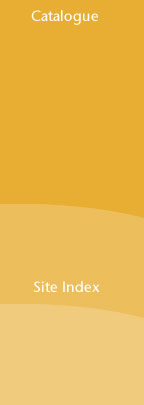
Fill the area with white.

3 – More watermarking, and some text

Right-click on your watermark layer, and select Duplicate Layer.

Click the new layer in the layer list.

Select the Move tool. Press Shift+Down Arrow about ten times. Holding shift makes the item move much further with each press.



Put in some white menu text, again in a sans-serif font. White doesn't contrast very well with orange, but it's still readable.

4 – Colourful titles

Create a new, small, rectangular image as shown.

Fill the image with a new colour.

Put in some sans-serif (non-curly) white text.

Click File > Save for Web, then change the text, then change the colour (by pressing Ctrl+U to bring up the Hue/Saturation sliders.)

5 – Picture icons

Choose a few pictures that are relevant to your site, or to something new that's on your site.

With the Crop Tool, start selecting an area of your image, then hold Shift, to make your selection square. (In Adobe Photoshop 7.0, press Enter once you're happy with the area you've selected.)


Click Image > Image size, and set the size to about 70x70.

6 – Making a web page from the pictures

(These instructions are accurate for Microsoft FrontPage, but other editors should be very similar.)

Insert your title image above this table. Right-click the page, choose Page Properties, and set the background colour to a dark colour.

4: Set the background of this cell as your menu image. (This allows you to put text on it.)

2: Cell width = the width of the menu image. (Right-click this cell.)

Background colour = colour of bottom of menu image.

Cell alignment = Top (Right-click this cell.)

Create a new table in this cell, with width and height equal to that of your menu image.

1: Create a 3-cell table - width 630 pixels. No borders or cell spacing/ padding. Right-click it the table and set the background colour to white.

Cell width = 630 pixels minus the width of the left cell and the right cell.

3: Cell width = the width of the menu image.

Cell alignment = Top

Put another table here, to put your text links in.

7 – The completed web page


____________________________________________________________________

Home
Information
Products
Services
Place an Order
Christmas Gifts
Special Offers
Promotions
Web Design
Store Locations
Contact Us


Other Links
Adobe Photoshop Tutorials


- - - - - - - - - - - - - - - - - - - - - -


Office Building - Right-click a picture, and set its alignment to Left. That way you can easily put text next to it like this, without needing to use tables.

- - - - - - - - - - - - - - - - - - - - - -
Horse
- Grey is the colour of choice in this style of web design. It fills up empty white space, and breaks up blocks of black text. Simply type a line of dashes and make it grey.

- - - - - - - - - - - - - - - - - - - - - -
Fireworks
- This is Size 1 Verdana font. It was created for web read- ability, and looks better than Arial at size 1.


To make their edges smooth, make the coloured titles in Adobe Photoshop.

Check out our latest designs. New items added. Click here.

Check out our latest designs. New items added. Click here.

Check out our latest designs.


Home | Information | Products | Services | Place an Order | Christmas Gifts
Special Offers | Promotions | Web Design | Store Locations | Contact Us


Always put a text menu at the bottom. Use "|" (Shift+\) as a separator.


pegaweb.com

What is eMarketing?

Written by Hodago on 7:41 AM

Very simply put, eMarketing or electronic marketing refers to the application of marketing principles and techniques via electronic media and more specifically the Internet. The terms eMarketing, Internet marketing and online marketing, are frequently interchanged, and can often be considered synonymous.

eMarketing is the process of marketing a brand using the Internet. It includes both direct response marketing and indirect marketing elements and uses a range of technologies to help connect businesses to their customers.

By such a definition, eMarketing encompasses all the activities a business conducts via the worldwide web with the aim of attracting new business, retaining current business and developing its brand identity.

What is E-Commerce ?

Written by Hodago on 6:02 PM

E-commerce, (electronic commerce), is online commerce verses real-world commerce. E-commerce includes retail shopping, banking, stocks and bonds trading, auctions, real estate transactions, airline booking, movie rentals—nearly anything you can imagine in the real world. Even personal services such as hair and nail salons can benefit from e-commerce by providing a website for the sale of related health and beauty products, normally available to local customers exclusively.

While e-commerce once required an expensive interface and personal security certificate, this is no longer the case. Virtual storefronts are offered by a variety of hosting services and large Internet presences such as eBay and Yahoo!, which offer turnkey solutions to vendors with little or no online experience. Tools for running successful e-commerce websites are built into the hosting servers, eliminating the need for the individual merchant to redesign the wheel. These tools include benefits like shopping carts, inventory and sales logs, and the ability to accept a variety of payment options including secure credit card transactions.

Though early e-commerce was stunted by security fears, improved technology has made millions of people worldwide feel comfortable buying online. Seeing the vast potential in e-commerce, most credit card companies helped allay fears by guaranteeing cardholders would not be held responsible for fraudulent charges as a result of online shopping. All of these factors have helped e-commerce become the booming industry it is today.

The growing popularity of e-commerce is understandable considering the time and hassle involved in running from store to store, searching for an item in the real world. It not only takes valuable time and energy, but gasoline. With today’s crowded cities and high gas prices, shopping online whenever the mood strikes—even in the middle of the night—has unarguable, unbeatable advantages. Not only is it convenient to shop at a myriad of vendors from the comfort of your computer chair, it’s also a snap to find the best deal by allowing sites like PriceGrabber and Froogle sift through hundreds of sellers for you.

E-commerce also has other advantages. Employee overhead is virtually nonexistent, and the yearly fee for an e-commerce website is nominal. Compare this to rental of storefront property, particularly in a busy mall. To top it off, most transactions are handled by software processes, never requiring a real person until the item is ready to be packed and shipped. This translates into real savings to the customer. As a result, real world businesses often cannot compete with their e-commerce counterparts, though one does have to watch for inflated shipping fees that might negate savings.

If you’ve been reticent to jump into the world of e-commerce head first, you might find your trepidations no longer founded. There are only a few simple rules when buying online. First, check to see that the seller is credible by referring to a site like ResellerRatings.com, and then read the site’s return and privacy policies. Also, never hand over personal information unless the website is operating through a secure server. You can identify a secure server by the address beginning with https, rather than http. The “s” means the information flowing between your computer and the website will be securely encrypted.

What is HTML?

Written by Hodago on 2:40 AM

What is HTML?

HTML is a language for describing web pages.

* HTML stands for Hyper Text Markup Language
* HTML is not a programming language, it is a markup language
* A markup language is a set of markup tags
* HTML uses markup tags to describe web pages

HTML Tags

HTML markup tags are usually called HTML tags

* HTML tags are keywords surrounded by angle brackets like
* HTML tags normally come in pairs like and
* The first tag in a pair is the start tag, the second tag is the end tag
*

Start and end tags are also called opening tags and closing tags.

HTML Documents - Web Pages

* HTML documents describe web pages
* HTML documents contain HTML tags and plain text
* HTML documents are also called web pages

The purpose of a web browsers (like Internet Explorer) is to read HTML documents and display them as web pages. The browser does not display the HTML tags, but uses the tags to interpret the content of the page

Angel Brush for Photoshop

Written by Hodago on 1:53 AM


Download here

What is Domain Name

Written by Hodago on 10:22 AM

A domain name is the core of your online identity. It is the address your customers, friends, and family will use to find information about your products and services on the web. Your domain name is yours entirely because once you complete the domain register process, no other party may use the same domain name. A Domain name is the essence of your company's online identity. It is your permanent address that can follow you no matter where you are located. This is a very powerful tool for individuals as well as businesses.

Computers connected to the Internet have unique numerical addresses so that electronic information is delivered to the right place. The domain name system (DNS) translates the numerical addresses of computers into more user-friendly names. The resulting domain names are easier to remember and help people to find information on the Internet.

Domain names are used to identify particular web pages. For example, in the web site address "http://example.com/index.html" the domain name is example.com.

Domain names are also used in e-mail addresses, for example, user@example.com, that enable people to send and receive electronic messages.

Domain names allow Internet users to type in a name, such as www.urlsoftware.com, to identify a numeric Internet Protocol (IP) address such as 69.93.6.178. The purpose of Domain name is to allow users connected to the Internet the ability to find web sites without having to memorize the long, numerical (IP) addresses that actually locate the computers or servers on the Internet.

Domain names always have 2 or more parts, separated by periods (called dots). The part on the left is the most specific, and the part on the right is the most general. Domain names can simply be thought of as your Internet address.

What is Top Level Domain (TLD) & Second Level Domain (SLD)?

TLD's (Top Level Domains) are the top level in the hierarchy of the Domain Name System. In the example "domain.com" the ".com" is the Top Level Domain.

TLD's in general are often referred to as the Namespace. For example the domain name domain.info is part of the .info namespace.

There are three types of TLD's.


1. The most common are gTLD's (generic Top Level Domains), such as .Com, .Net, .Org., and now .Info. Anyone is authorized to register domain names in a TLD namespace.

2. rTLD's (restricted Top Level Domains) such as .Biz and .US only allow people who meet certain criteria to register domain names, such as Business related sites for .Biz.

3. ccTLD's (country code Top Level Domains) such as .in (India) are individually assigned to countries and their dependencies. Each country sets specific registration criteria.

Every TLD Registry - generic, restricted, or country code - has its own prices, policies, and procedures that Registrants are subject to.

Second Level Domain

In the Domain Name System the level of the hierarchy underneath the Top Level Domains is called "second level domains." In the example domain name "Domain.com" the "Domain" part is the second level domain. Second level domain names are what you register in the Top Level Domain Registry database using the services of the Registrar.

How Do I Choose a Domain Name For My Internet Business?

Written by Hodago on 3:13 AM

Because domain names are products that carry a certain market value, trading in domain names has become a serious business in its own right. People buy and sell domain names on domain auction sites and prices vary from very cheap to astronomically expensive, depending on the perceived brand or keyword value of the name.

However, if you can choose a domain for your website that has never been used before you will be able to register it for less than $20 without having to buy it at all.

How To Choose A Domain Name

There are two approaches to choosing a suitable domain for your website: (1) Branding, and (2) keywords.

1. Branding - Use your own name or company name as the domain name of your website.

If you want to raise the profile of your company and turn it into brand in its own right, using it as your domain name is a great idea.

Take a company like Amazon.com for example. There is nothing in the domain name amazon.com to suggest that Amazon sells books, yet when you hear the name Amazon you will probably think either of a big river in South America, or a big bookstore on the Internet, and in many cases it will be the latter that is thought of first!

That is the power of brand names.

Some people choose to turn their own name into a brand name. Entrepreneurs, politicians, artists will often secure their own name as their brand name. The most famous recent example of this is now living in the White House. You can check out his website at barackobama.com.

So, branding yourself via your domain name can be a very smart move.

However, if you are just starting out, you might want to consider using relevant keywords in your domain name to raise the profile of your website. This is an excellent idea if you are promoting a well defined niche market.

2. Keywords - Choose a domain name that reflects the type of business you are in.

There are a couple of advantages to be had with a keyword rich domain. Firstly, it sends a clear message to anybody searching for the products you are selling that your website is the place to find them. Secondly, the keywords in your domain will help your website's search engine ranking for those particular words.

Choosing a Keyword Rich Domain Name

Make a list of keywords that are related to the main theme or chief content of your website. Aim to get a domain name with one or two of your keywords in it; a short domain name is better but you will probably need to use more than one keyword to find a domain name that is available.

The easiest way to work on your domain name is to use a free domain search website such as instantdomainsearch.com/ and type your ideas straight into the search browser to instantly discover whether or not they are available. If your first search is not successful, play around with the keywords and try to find a good combination that (a) makes some kind of sense, (b) is a fair reflection of what your business is about and (c) is available.

Also, if you are planning on starting a business site, make sure that you get the.com extension. Generally speaking, domains that end in .com are easier to remember and look more professional. However, if your business is focused on a single country then you might want to use .co.uk, co.jp, etc.

If your chosen domain name is not available and is one that you have set your heart upon, you may be able to buy it from the owner. As I mentioned, many people buy and sell domain names as a business. Be warned, though... A domain name with a couple of high ranking keywords in it is likely to be expensive. Whereas you can register an available domain name for a few dollars, you may have to spend several thousand dollars to secure a great domain name on the open market.

Darrell Howell is an Internet Marketer and Blogger. Check out his Blog at http://www.blueridgemoney.info Sign up for a free Internet Marketing Newsletter here.

Debit cards and credit cards - the difference

Written by Hodago on 8:47 PM

When you buy goods or get cash with a debit card the money is taken from your bank account right away. With a credit card you get a monthly a bill. If you don't repay the amount owed in full on a credit card, or if you take out cash, the charges are very high.

How debit cards work

Debit cards are linked directly to your bank account. You can use them to buy goods or withdraw cash and the amount is taken from your account right away.

You can also use debit cards to get 'cashback' from certain shops (you buy goods and also ask for money back from the cashier). The total amount is deducted from your account right away.

When using a cash machine or paying for goods with a debit card you'll need to enter your PIN (personal identity number). When buying goods you usually enter it into an electronic hand held device, but in some cases you may have to sign.

Most bank accounts offer debit cards. Most debit cards double up as 'cheque guarantee cards', guaranteeing that your cheque will be honoured by your bank up to a stated amount.

What happens if there's not enough money in your account?

This will depend on the type of debit card you have:

  • if you have a ‘Solo’ or ‘Electron’ debit card the balance in your account is checked before each transaction – if there’s not enough money you won’t be able pay or withdraw cash with the debit card without prior agreement
  • if you have ‘Switch’, ‘Visa’ or ‘Delta’ card your account balance won’t necessarily be checked and the payment may still go through

If you go overdrawn the charges you’ll pay will depend on whether or not you have an authorised overdraft arrangement with your bank. If you do, you’ll pay the agreed amount of interest at the end of each month. This is usually much lower than interest charged on credit cards.

If you don’t have an overdraft agreement, or you exceed the agreed limit, your bank may allow the payment to go through but you’ll usually pay much higher fees than if you had an agreed overdraft.

Using a debt card over the phone or internet

Debit cards can be used to make payments by phone or over the internet. In this case you'll need to provide certain details that are printed on your card. Find out more and view an example debit card on the FSA website.

How credit cards work

Credit cards allow you to 'buy goods now and pay later' - called 'buying on credit'. They aren't linked to your bank account. Like debit cards, they can be used to buy goods in shops over the telephone and internet, with the same details being required. You can also get a 'cash advance' by drawing money at bank cash machines.

Your bank may offer you a credit card, or you can apply for one to any institution offering one. The credit card provider will normally run checks to see if you've had problems repaying debts before offering you one (called a 'credit check').

The risks of using a credit card

Think carefully before using a credit card. If you don't repay your bill in full by the date shown you're charged interest on the whole amount of the bill for that month. The rates of interest - indicated by the APR (annual percentage rate) - can be very high indeed.

If you take cash out with a credit card you're charged daily interest from the moment you take out the cash until the credit card bill is paid in full. This is an expensive way of borrowing money.

Some credit cards also charge you an annual fee simply for having the card.

Directgov

Your questions answered before you ask !

Custom Search
