Register domain names at CO.CC
Written by Hodago on 7:26 PMCurrent needs have 1 domain name associated streamlined, easy to remember, especially for free personal web blog is very high. Today you would like to guide you how to register your domain type 1 www .* **. co.cc To register for free domain name that you follow these steps:
The first click in the picture  to the homepage.
Next steps:
Step 1: Register 1 account, as the site of 1 of this account can register domain 3. You enter information such as the following and select Create a account (at the bottom of page)
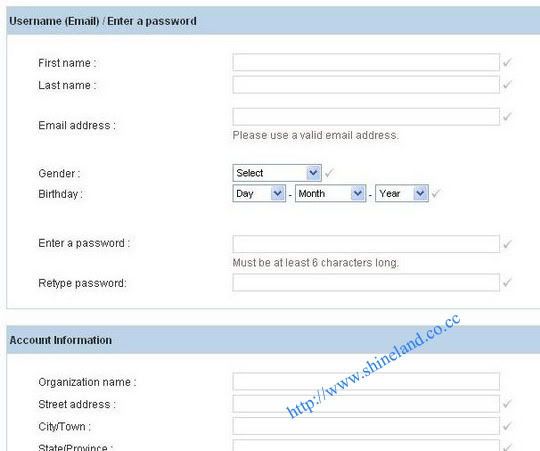
Step 2: After selecting create a account you will see the page's management as the bottom. Here I will guide you on the part of the set up the left hand.
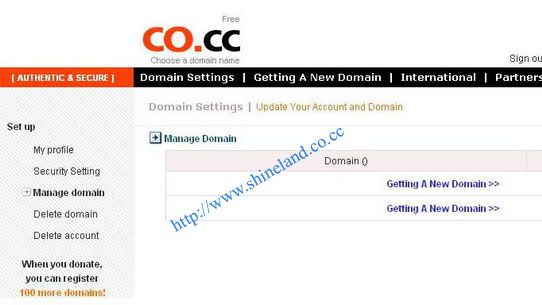
Here I will guide you in part set up by the left hand side. Section set up categories including:
My profile: to edit your account information.
Security settings:
Manage Domain:
Delete Domain: Domain deleted (domain name) you want to remove. 1 account for only 3 domain so sometimes we Delete domain is not necessary to create domain than necessary.
Delete account: so that you can delete this account when you no longer need to use.
Step 3:
Domain registration (domain name): Manage in the domain you click on Getting a New Domain will take you to the test domain was registered or not.
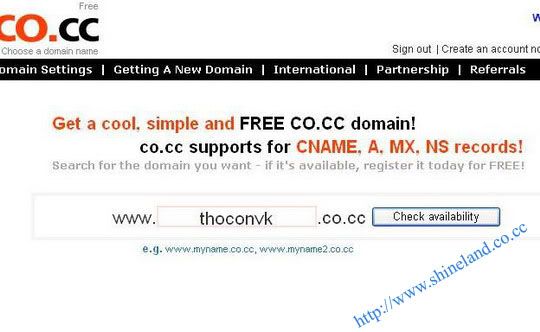
If the Domain has been registered who are we to select another Domain 1. If Domain is not registered it will cost the sites below.
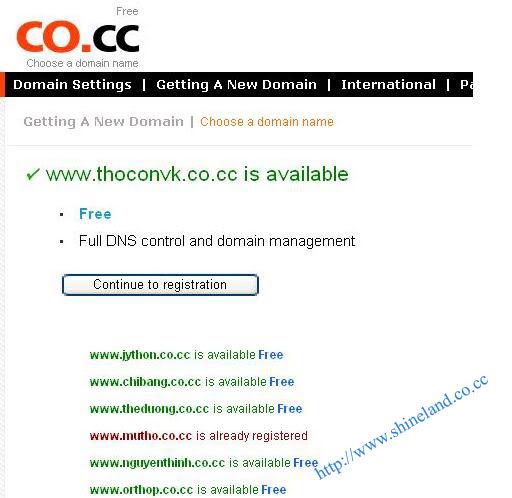
and we click Continue to registration, such as we have completed registration 1 domain.
 | Posted in »


0 comments: Responses to “ Register domain names at CO.CC ”